
You Should Too.
You Are Almost Certainly Paying for Something You've Forgotten About
Let me ask you something. Right now, off the top of your head — how many subscriptions do you have? Not a rough guess. An actual number.
Most people can't answer that. And it costs them. Research consistently puts the average person's monthly subscription spend at well over their own estimate. The gap between what people think they pay and what they actually pay sits somewhere between £30 and £50 a month for a typical household — and that's before you factor in annual subscriptions that auto-renew while you're not paying attention.
The pattern is always the same. You sign up. You forget. The renewal hits. You think "I'll cancel after this month." You don't. Repeat.
There are apps that solve this. Some of them cost money. I decided to build my own — for free — using an AI application builder called Base44. It took ten minutes. Here's exactly how I did it and what you can do with it.
What Is Base44?
Base44 (app.base44.com) is an AI application builder that takes plain language and turns it into a working, hosted web application. We're not talking about a landing page generator or a no-code form builder. This is full-stack: frontend, backend, database, APIs, hosting — all generated from a single prompt.
It's positioned as what the industry is calling "vibe coding" — you describe what you want, the AI builds everything, and you refine it through conversation. No drag-and-drop templates. No coding required. Just describe your idea and watch it appear.
Their positioning is blunt: idea → working product in minutes. In my experience, that's not marketing copy. It's accurate.
The Exact Prompt I Used
I opened Base44, typed one sentence, and hit enter:
Build me a subscription tracker that monitors all my payments and alerts me before renewals.
— The only prompt needed
Base44 confirmed what it was going to build, laid out its plan, and started generating. Within the planning response it had already identified four core modules: a dashboard, subscription management, renewal alerts, and analytics. I didn't ask for any of those specifically. It inferred them from the brief.
The initial build came back in US dollars and US date formats. I went into edit mode and asked it to switch to GBP and UK date formats. Done. Two minutes of adjustments.
The result — before I even started populating it with my own data — looked like this:
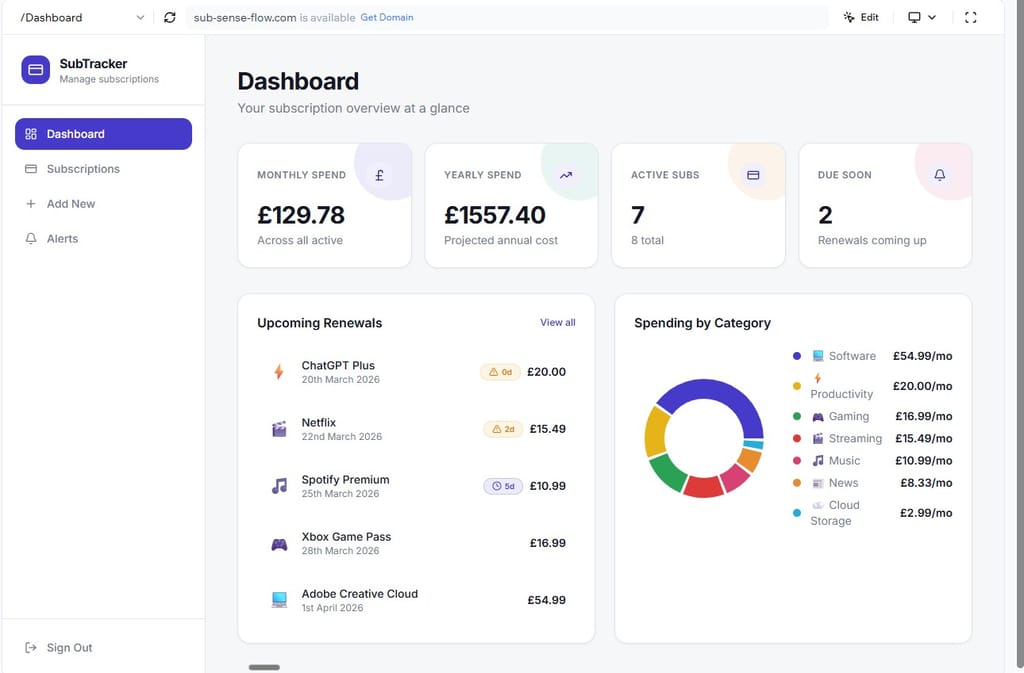
The SubTracker dashboard — generated by Base44, adjusted to GBP and UK formats in under two minutes.
The Features That Came Out of the Box
- Dashboard overview — Total monthly spend, projected annual cost, number of active subscriptions, and renewals coming up. All live-calculated from your data.
- Upcoming renewals panel — Chronological list of every renewal due, with colour-coded urgency indicators. Overdue shows in amber. Days-to-renewal displayed clearly.
- Spending by category chart — Donut chart breaking your spend across categories: Software, Productivity, Gaming, Streaming, Music, News, Cloud Storage.
- Subscription management — Add, edit, and delete subscriptions with fields for name, cost, billing cycle, renewal date, and category.
- Sidebar navigation — Dashboard, Subscriptions, Add New, Alerts — clean, functional, nothing excessive.
Everything you'd pay for in an app like Truebill or Rocket Money. Built to my spec, for free, in ten minutes.
20 Things You Could Build With This Tool
The subscription tracker is a clean first use case because everyone has the pain. But Base44 isn't limited to tracking — it's a full application builder. Here's a practical list of what you could build, split by context:
🏠 Everyday Life
💼 Work & Business
The common thread across all of these is simple: they're lightweight systems that replace spreadsheets, notes, and manual tracking. That's the sweet spot where Base44 excels.
Where Does Your App Actually Live?
This was the first question I had after the build. You don't have to log into Base44 every time you use your app — and neither do the people you share it with.
- Your app is automatically hosted by Base44 on a live URL the moment you build it
- Default URL format: your-app.base44.app — or connect your own custom domain
- End users access it like any website — no Base44 account needed
- If your app has login, that authentication lives inside your app, not Base44
- You only log into Base44 to build, edit, or manage the app
- For more control: export the code (React / Next.js) and deploy to Vercel, AWS, or Google Cloud
Think of Base44 as a Platform-as-a-Service with built-in hosting. Development and deployment are bundled. User access is a standard web URL. If you outgrow it, you take the code with you.
What Does Free Actually Mean Here?
Base44 operates a freemium model. The free tier gives you enough to build and deploy functional applications — including everything I built in this walkthrough. Paid plans unlock additional capabilities around scaling, more complex builds, and production-grade features.
For personal use cases — subscription trackers, budget tools, personal dashboards — the free tier is genuinely sufficient. You don't need a paid plan to get value here. Build it, use it, and upgrade only if you need to.
I've been in IT programme delivery for a long time. I've watched "no-code" tools come and go — most of them either required more technical knowledge than advertised or produced something so limited it wasn't worth the time. Base44 is different, and here's why that matters.
That's not trivial. For the individual, it means you can build tools that solve your specific problems rather than adapting yourself to someone else's product. For businesses — particularly smaller ones — it means custom internal tooling without developer cost or delay.
The subscription tracker is a simple example by design. It demonstrates the principle without overwhelming the build. But the same mechanism that created it can create a client portal, a lightweight CRM, an internal project tracker, or a customer-facing product. The prompt changes. The process doesn't.
My recommendation: start with something you actually need. Don't build for the sake of it. Pick a problem you're currently solving in a spreadsheet or a notes app, and describe what a better solution would look like. Base44 will build it. You'll be surprised how quickly useful becomes powerful.
This is a bonus issue. The full Zymbos Intelligence archive — including step-by-step build walkthroughs, tool breakdowns, and deeper intelligence on AI adoption — is available to subscribers.
Access Full Intelligence at zymbos.ai →